
Travel Routers: Why You Might Actually Want One
Do you need a travel router?
Depending on your situation, but need, probably not. Most people get by fine with their phone’s hotspot, the occasional dodgy hotel WiFi, and a healthy dose of patience. But if you’ve ever found yourself wanting to share one WiFi connection across multiple devices without burning through mobile data, or just got tired of re-entering WiFi passwords on four different devices every time you check in somewhere, or find yourself in a Japanese hotel staring at an ethernet cable with no laptop port to plug it into - a travel router starts to make a lot of sense.
I picked up a GL.iNet GL-MT3000 Beryl AX (quite a mouthful, let’s cally it Beryl AX, initially for travel, but have found it great for home use too. Fast WiFi 6, AdGuard ad-blocking, the ability to run a VPN at the router level. I’m looking forward to trying it out on the road.
Here’s what I’ve learned, and whether it’s worth adding another device to your travel kit.
What Is a Travel Router?
A travel router is a small, portable device that creates its own WiFi network from whatever internet source you give it. That could be:
- Hotel WiFi — Connect the router once, then all your devices connect to it
- Ethernet cables — Many Japanese hotels have wired connections; the router converts them to WiFi
- Your phone’s hotspot — Offload the WiFi hosting to the router so your phone isn’t working overtime
- Free public WiFi — Accept the terms once on the router, and everything else just works
Think of it as a middleman between whatever internet is available and all your devices.
Why Would You Want One?
1. Connect Once, Not Five Times
Every time you check into a new hotel, you probably have to:
- Find the WiFi network
- Enter the password (often printed on a tiny card in a font designed for ants)
- Maybe accept some terms and conditions
- Repeat for your phone, laptop, tablet, partner’s phone, partner’s laptop…
With a travel router, you connect the router to the hotel WiFi once. Everything else connects to your router automatically — same network name, same password, every hotel.
2. Turn Wired Connections into WiFi
This is particularly useful in Japan, where many hotels still offer ethernet ports rather than (or in addition to) WiFi. If your laptop doesn’t have an ethernet port — and most modern ones don’t — you’d normally need a USB adapter.
Or you plug the cable into your travel router and create your own WiFi network. Now your laptop, phone, and everything else has fast, wired-speed internet.
3. Share Free WiFi Without Burning Data
In places like Thailand, you’ll find free WiFi zones in some areas — malls, cafes, certain streets. You could connect your phone and use up your eSIM data for your laptop. Or you could connect the router, and share that free WiFi across all your devices.
One connection, multiple devices, zero mobile data used.
4. VPN Everything
This is where it gets interesting for the security-conscious.
Most VPN apps work well on phones and laptops. But what about your e-reader? Your tablet? That smart device that doesn’t have a VPN option?
When you run a VPN on your travel router, everything connected goes through it. Set and forget.
My setup: I started with CyberGhost, but the configuration was fiddly. Switched to NordVPN, which was much smoother to set up. The router handles it all — I don’t think about it once it’s running.
5. Block Ads at the Network Level
The Beryl AX (and most GL.iNet routers) supports AdGuard DNS filtering. Turn it on, and ads get blocked across all connected devices. Your phone. Your laptop. Even apps that don’t normally support ad-blockers.
Is it life-changing? No. Is it nice? Yes.
Real-World Use Cases
Japan: Ethernet to WiFi
Many Japanese hotels, especially business hotels, have ethernet ports in the rooms. The WiFi might exist but be slow or congested. Plug the ethernet into your travel router, and suddenly you’ve got fast, private WiFi for everything.
Thailand: Maximising Free WiFi
Free WiFi zones exist in many tourist areas. Instead of connecting each device individually (and using precious mobile data on the others), you connect the router once and share it. Your partner’s phone works, your laptop works, nobody’s burning through their eSIM allocation.
Anywhere: Same Network, Every Hotel
This is the underrated quality-of-life improvement. My devices are already configured to connect to my travel router’s network. Check into a new place, connect the router to whatever internet they offer, and everything else just… works.
No hunting for passwords. No re-entering them on five devices. No reconfiguring anything.
A Word About Cruise Ships
Some cruise ships have caught on to this trick. They charge per device for WiFi, and they actively look for travel routers that might be sharing one connection across multiple devices.
If you’re planning to use a travel router to sidestep cruise ship WiFi pricing, be aware it might not work — and it might violate their terms of service. Worth checking before you try.
What to Look For in a Travel Router
Not all travel routers are created equal. Here’s what matters:
WiFi Standard
- WiFi 6 (802.11ax) — Faster, better with multiple devices
- WiFi 5 (802.11ac) — Still fine for most uses, often cheaper
VPN Support
- Look for WireGuard or OpenVPN support built-in
- Bonus if it’s pre-configured to work with major VPN providers
Size and Portability
- Truly pocket-sized matters when you’re already carrying too much
Ethernet Ports
- At least one WAN port to plug in wired connections
- Ideally a LAN port too for wired devices
Power
- USB-C power is convenient (same cable as your phone)
- Some can run off a USB battery pack in a pinch
My Pick: GL.iNet Beryl AX
I found a great price and went with the GL.iNet Beryl AX (GL-MT3000).
Why I chose it:
- WiFi 6 — fast enough for multiple devices streaming
- Built-in VPN support — WireGuard and OpenVPN, works with NordVPN
- AdGuard DNS — ad-blocking across all devices
- Compact — genuinely pocketable
- USB-C powered — one less cable type to carry
What I use it for:
- Home: Fast WiFi with VPN and ad-blocking always on
- Travel (planned): One-time WiFi setup, share with partner, ethernet conversion in hotels
GL.iNet GL-MT3000 (Beryl AX) Portable Travel Router

It’s not the cheapest option, but for the features and reliability, it’s been worth it.
Other Options Worth Considering
Budget Travel Router Options
GL.iNet GL-MT300N-V2 (Mango) Pocket Travel Router
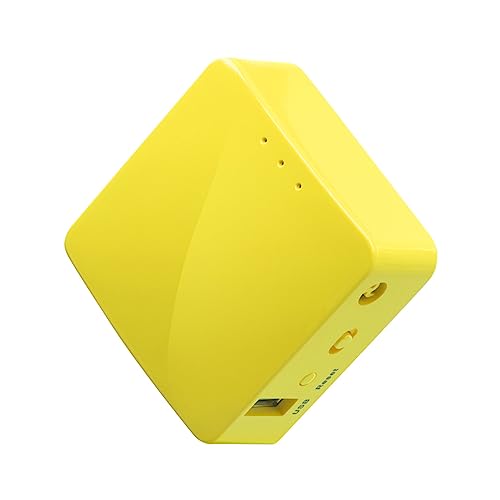
- Tiny, basic, but works
- Great if you just want ethernet-to-WiFi conversion
- No WiFi 6, limited VPN performance
There is also this TP-Link, but I prefer the GL.iNet:
TP-Link AC750 Wireless Portable Nano Travel Router(TL-WR902AC)
- Dual-band WiFi, multiple modes
- Widely available
- Less VPN-focused than GL.iNet
Other Premium Travel Router Options
- More powerful, more features
- If you need to connect many devices or run heavy VPN traffic
GL.iNet GL-AXT1800 (Slate AX) Portable Travel Router

GL.iNet GL-BE3600 (Slate 7) Portable Travel Router

Some of the links here are affiliate links. If you purchase through them, I may earn a small commission at no extra cost to you.
If you’re using a GL.iNet router with NordVPN (or similar), the process is:
- Log into your router’s admin panel (usually via browser)
- Go to VPN → OpenVPN Client or WireGuard Client
- Download config files from your VPN provider
- Upload them to the router
- Enable the connection
NordVPN (This is a referral link) has specific instructions for GL.iNet routers. It took me about 15 minutes once I found the right guide. CyberGhost was more complicated — I had to generate custom config files — which is why I switched.
Do You Actually Need One?
Probably yes, if you:
- Travel frequently and hate re-connecting devices
- Stay in hotels with ethernet but no WiFi
- Want VPN protection across all devices
- Travel with a partner and share connections
- Value the “set it once, forget it” convenience
Probably no, if you:
- Rarely travel
- Are happy with your phone’s hotspot
- Don’t care about VPNs
- Prefer to travel as light as possible
For me, I’d heard about travel routers and found a great price, so decided to give it a go. The combination of convenience (one network everywhere), security (VPN everything), and flexibility (ethernet, WiFi, hotspot — doesn’t matter) has been worth the small amount of space it takes up.
Pairing With an eSIM
Travel routers and eSIMs work well together. Your eSIM gives you mobile data anywhere. Your travel router lets you share that connection across devices, or connect to local WiFi and share that instead.
For more on eSIMs, see: eSIMs Explained: The Traveller’s Guide to Staying Connected
A travel router won’t change your life. But it might make every hotel check-in slightly less annoying, every WiFi connection slightly more secure, and every “can you share the hotspot?” slightly less awkward. Are you interested in adding one to your kit?